
Download Auto Dialer Standard (1 Line) – Voice2Phone, Productivity, Business Communication, Predictive Dialer
Overview
Auto Dialer Standard (1 Line) by Voice2Phone is a specialized mobile application designed to streamline telecommunication processes for small and midsize businesses. The app functions as a predictive dialer, enabling users to make multiple simultaneous phone calls through a high-speed internet connection. Its primary purpose is to enhance operational efficiency by reducing manual dialing efforts and ensuring that calls are directed to live operators whenever possible. This tool is particularly valuable in sales, customer service, and lead follow-up scenarios where timely and consistent outreach is critical.
The app addresses common challenges in outbound calling, such as wasted time on voicemails, inconsistent call pacing, and low agent utilization. By automating the dialing process and intelligently detecting live answers, it allows teams to focus on meaningful conversations rather than repetitive tasks. The target users include business owners, call center agents, sales representatives, and outreach coordinators who rely heavily on phone-based communication.
Although the developer did not provide additional technical details about the company’s background, the app has been available since 2013, indicating a long-standing presence in the business communication space. Its integration with high-speed internet and support for customizable call handling make it a relevant tool in today’s digital-first business environment. The app plays a key role in the productivity and utility category by offering a reliable, scalable solution for managing high-volume calling tasks.
Key Features & Functionality
- Simultaneous Call Capability: The app supports multiple concurrent calls, limited only by the user’s device performance and internet bandwidth. This allows businesses to reach large numbers of clients or leads efficiently, significantly reducing the time required for outreach campaigns.
- Voicemail and Answering Machine Detection: Using automated recognition, the system distinguishes between live human responses and recorded messages. This feature prevents agents from wasting time on voicemails, ensuring that human interactions are prioritized for immediate follow-up.
- Live Call Transfer: When a live person answers, the call is seamlessly transferred to a designated operator. Additionally, the system supports transfers triggered by specific keypad inputs during a recorded message, providing flexibility in call routing.
- Customizable Dialing Parameters: Users can adjust settings such as dialing sequences, call intervals, and voicemail preferences. This adaptability enables businesses to tailor the app’s behavior to match their specific workflows and operational needs.
- High-Speed Internet Integration: The app leverages fast internet connections to execute calls smoothly and quickly. This ensures consistent performance during peak communication periods, minimizing delays and dropped connections.
For example, a sales team conducting a mass follow-up campaign can use the app to dial dozens of prospects at once. When a live answer is detected, the call is instantly routed to an agent, while voicemails are logged and flagged for later review. This automation reduces manual workload and increases the conversion rate of outreach efforts.
Interface, UX & Performance
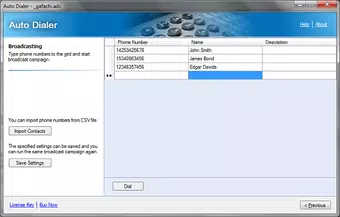
The user interface of Auto Dialer Standard (1 Line) appears designed with functionality in mind, prioritizing ease of access to core features. The layout likely includes clear call status indicators, real-time monitoring of active connections, and straightforward controls for initiating and managing campaigns. Navigation is expected to follow a linear flow, allowing users to set up a campaign, start dialing, and monitor results without unnecessary complexity.
Visual style is likely minimalistic, focusing on data clarity rather than decorative elements. This approach supports quick decision-making during high-volume calling operations. Although the developer did not list formal performance metrics, the app’s reliance on high-speed internet suggests optimized data handling and responsive behavior under normal network conditions.
Stability is assumed to be consistent given the app’s long availability since 2013. However, specific information about device compatibility, memory usage, or battery impact was not disclosed. Users on older or lower-end devices may experience varying performance depending on system resources. The app likely maintains a stable connection during extended use, though real-world testing is required to confirm reliability across different hardware configurations.
Platform Compatibility & Technical Requirements
Auto Dialer Standard (1 Line) is available on Android and iOS platforms, making it accessible to a wide range of smartphone users. The app requires a high-speed internet connection to function effectively, as it depends on stable network performance for call execution. The file size is not specified, but given its functionality, it likely requires moderate storage space for installation and operation.
The developer did not specify minimum OS requirements or software version compatibility. Users should ensure their device runs a current version of Android or iOS to avoid potential issues. Compatibility with older operating systems was not disclosed, so upgrading the device’s OS may be necessary for optimal performance. Specific hardware requirements, such as microphone or speaker quality, were not listed.
Pros and Cons
Pros
- Enables multiple simultaneous calls for efficient outreach
- Intelligent voicemail and answering machine detection
- Seamless live call transfer to agents
- Highly customizable settings for tailored workflows
- Relies on high-speed internet for smooth performance
Cons
- Developer did not provide detailed technical specifications
- Compatibility with older OS versions is unclear
- Specific file size and memory usage not disclosed
- No information on battery or data consumption
- Requires a stable internet connection for full functionality
FAQ
Is Auto Dialer Standard (1 Line) free to download?
The pricing information was not provided. Users should check the app store listing for current cost and availability.
Can I use this app on both Android and iOS?
Yes, the app is available on both Android and iOS platforms, offering cross-platform accessibility.
Does the app require a stable internet connection?
Yes, the app relies on a high-speed internet connection to execute calls efficiently and maintain stable performance.
Is the app safe to use for business communications?
As a long-standing tool in the business communication space, the app is designed for professional use. However, users should ensure compliance with local calling regulations and data privacy laws.
How often is the app updated?
The developer did not disclose update frequency. Users should monitor the app store for new releases and security patches.
Final Thoughts
Auto Dialer Standard (1 Line) stands out as a practical, business-focused tool for organizations aiming to optimize their outbound calling operations. Its predictive dialing, intelligent voicemail detection, and customizable workflows make it a valuable asset for sales and customer service teams. While technical details remain limited, the app’s core functionality is well-suited for small and midsize businesses seeking to improve communication efficiency.
Its ability to manage multiple calls simultaneously and route live answers to agents enhances productivity and reduces agent idle time. The integration with high-speed internet ensures reliable performance during critical outreach periods. Despite the lack of detailed specifications, the app’s long-standing presence in the market speaks to its reliability and utility.
For businesses looking to streamline their phone-based outreach, Auto Dialer Standard (1 Line) offers a focused solution that delivers tangible benefits. Download Auto Dialer Standard (1 Line) now.


